

Learn anything from a video
Turn an hour-long tutorial into the steps, the strategy and the first move, fitted to what you're building, in about ten minutes.
Watching isn't learning. Most people finish a tutorial with a good feeling and no next step, and a week later most of it is gone.
A summary doesn't fix that. It gives you a shorter version of the same feeling.
This prompt takes the video apart: what happens first, second and third, why, what each step needs, what the creator does without explaining, and what's missing. You come out with something you can run.
We wrote it the day an hour-long video felt like too much time. We wanted what mattered in it, shaped to what we're building, and kept somewhere we could learn from later.
The quickest way
Open the YouTube video in Chrome, click the Claude or ChatGPT extension in your toolbar, paste the prompt below and press Enter. Step 1 shows each click.
No extension? These buttons copy the prompt and open a new chat. Paste it, then paste the video's transcript under it (step 2 shows how to copy it).
The zip has the prompt, the make-it-about-you line, four follow-up prompts and the playbook merge.
Download the zip Free zip
or copy the helper prompt
Video Extraction Prompt

Operate as a world-class video extraction analyst, systems strategist, implementation architect, and business/process reverse engineer.

Your job is to analyze this video deeply and extract the real value from it so I can actually use what it teaches.

This is NOT a summary task.
This is NOT a recap task.
This is a deep extraction, reverse-engineering, and implementation task.

MISSION

Break down the video and extract:

1. the step-by-step process
2. the frameworks being used
3. the strategy behind what is being taught
4. the methods, tools, and systems involved
5. the hidden nuances and details most people miss
6. the logic behind the sequence
7. what is essential vs optional
8. what I still need clarity on in order to execute this properly
9. what should be researched, verified, or decided outside the video
10. how to actually apply it in the real world

HIGH-LEVEL BEHAVIOR

When extracting, behave like:
- an elite analyst who can reverse engineer systems from demonstrations
- a strategist who can see the business or operational logic beneath the surface
- a practical operator who can turn ideas into usable sequence
- a teacher who can simplify without dumbing things down
- a pattern recognizer who can identify what is implied, not just what is said

That means:
- extract signal, not filler
- identify both explicit and implied methods
- separate tactics from strategy
- separate explanation from actual process
- identify dependencies, bottlenecks, assumptions, and gaps
- organize the output so it is actually usable
- point out what is still unclear or missing for real execution

IMPORTANT RULES

- Do not summarize loosely.
- Do not give generic takeaways.
- Extract the real operational logic.
- Show what happens first, second, third, and so on.
- Identify the hidden assumptions and details that are easy to miss.
- Make the output implementation-ready.
- If the video leaves gaps, say so clearly.

OUTPUT STRUCTURE

SECTION 1: What the video is really about
- What is the actual point of the video?
- What is it really trying to teach, prove, or help someone do?

SECTION 2: Core strategy
- What is the main strategy behind the video?
- What is the bigger business, content, operational, or marketing logic underneath it?
- Why does this strategy work?

SECTION 3: Step-by-step process
Turn the video into the clearest sequential process possible.

For each step include:
- what to do
- why it matters
- what input is needed
- what output should result
- what depends on this step later
- what to verify before moving on

SECTION 4: Frameworks and methods
Identify every framework, method, model, or repeated pattern being used.

For each include:
- name
- what it is
- what it does
- why it matters
- where it fits in the process
- how it connects to the larger strategy

SECTION 5: Tools, systems, and moving parts
List:
- tools used
- platforms used
- systems involved
- resources needed
- integrations or dependencies
- any setup requirements

Explain what role each one plays.

SECTION 6: Hidden nuances
Identify:
- hidden assumptions
- subtle decisions
- things they do naturally without fully explaining
- sequencing details
- judgment calls
- what most viewers would miss
- what seems small but matters a lot

SECTION 7: Essential vs optional
Separate:
- what is core
- what is supportive
- what is optional
- what can wait
- what should be done first for the fastest correct implementation

SECTION 8: What still needs clarity
Identify what the video does NOT explain well enough.

Include:
- missing steps
- ambiguous instructions
- unresolved dependencies
- things that need further research
- decisions the viewer still needs to make
- questions someone should answer before trying to implement this

SECTION 9: Risks, bottlenecks, and common mistakes
Explain:
- where people will likely get stuck
- what they will misunderstand
- what they may do out of order
- what could break the whole process
- what usually looks easier than it really is

SECTION 10: Real-world implementation path
Give the cleanest practical version of how someone should actually use this in the real world.

Include:
- best first move
- best beginner path
- what to ignore at first
- what to double-check
- what should happen next after watching the video

SECTION 11: Highest-leverage takeaways
List the most important lessons, insights, distinctions, or truths from the video.

SECTION 12: Final synthesis
End with:
- what matters most
- what the real lesson is
- what should be done first
- what still needs clarification before execution
- what would create the biggest result if applied properly

OUTPUT STYLE

Make the output:
- deep
- structured
- sequential
- practical
- implementation-ready
- high signal

Do not summarize.
Reverse engineer the video and turn it into a usable system.
Step by step
1 Open the video with your AI beside it
The quick way, in Chrome on a computer with the Claude or ChatGPT extension added.
Open the YouTube video you want to learn from.
Click the Claude extension (the orange star) or the ChatGPT extension (the knot) in your toolbar.

The panel opens beside the video. Paste the prompt from the top of this page into the message box and press Enter. It reads the video you're on.
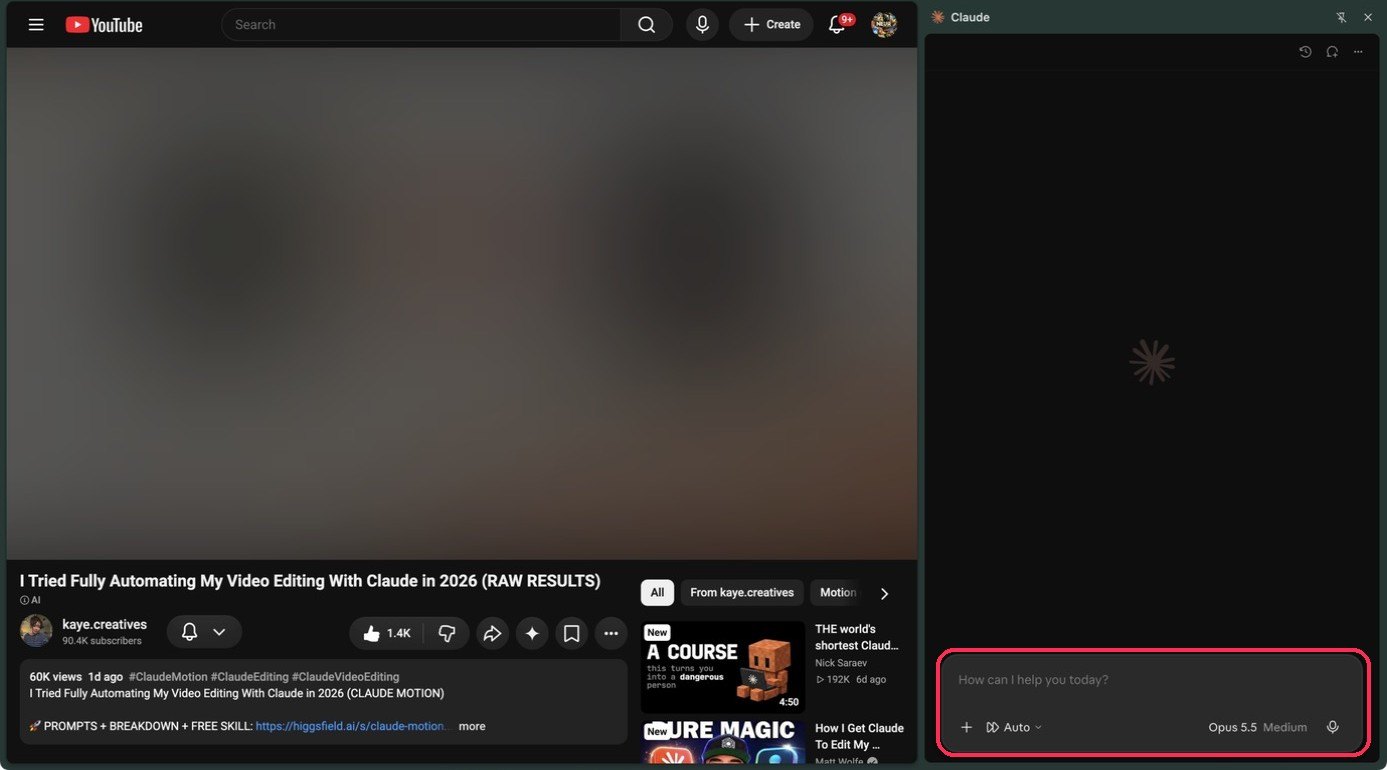
Claude in Chrome needs a paid Claude plan. ChatGPT's extension works with a free account. Neither runs in Safari or on a phone.
2 No extension? Copy the transcript
Works in any AI chat, on any plan.
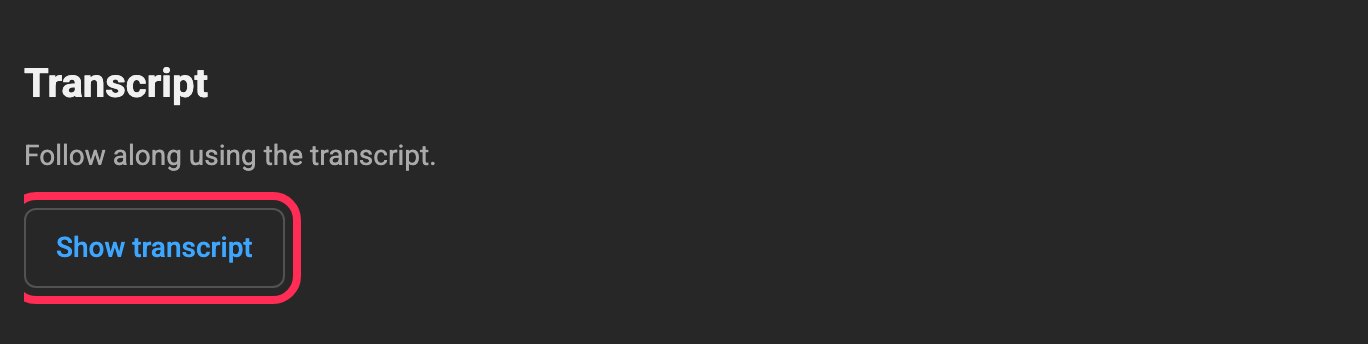
Under the video, click "more" at the end of the description.

Scroll down to "Transcript" and click "Show transcript".
A panel called "In this video" opens. Click the three dots at its top.
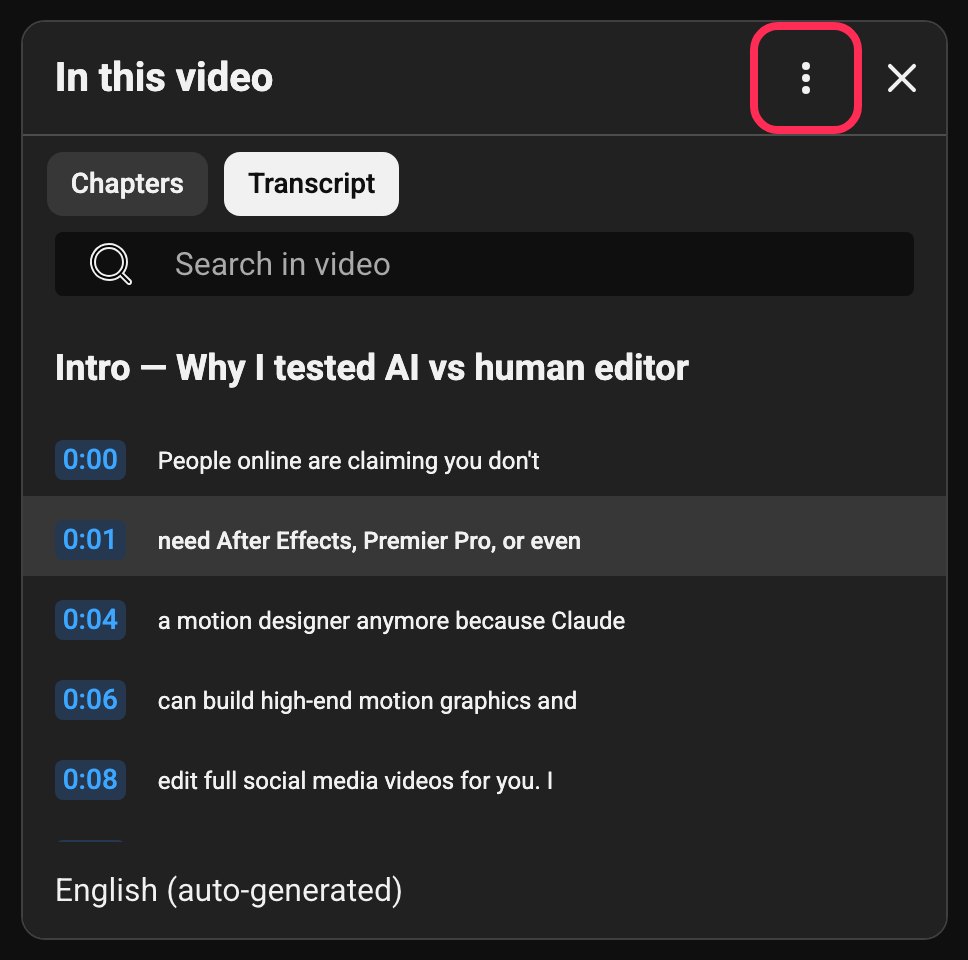
Click "Toggle timestamps" so only the words are left.
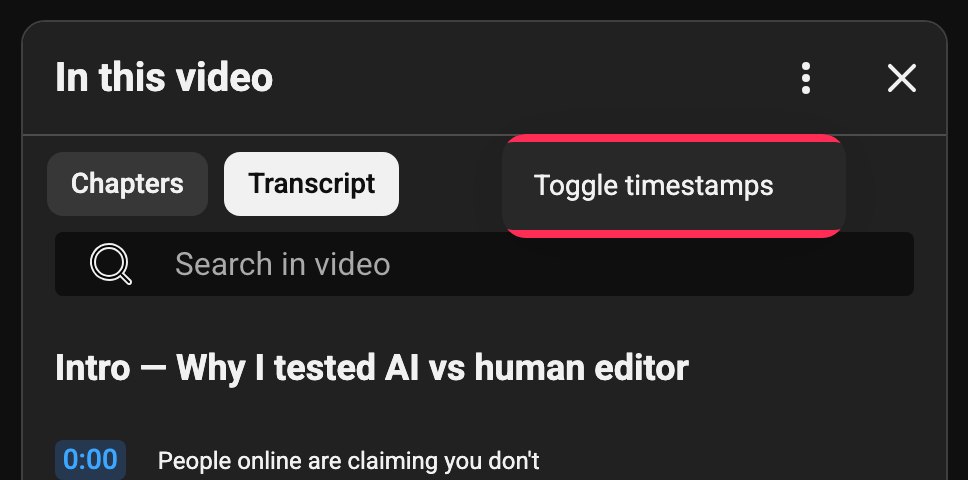
Select the whole transcript and copy it (Cmd+C on a Mac, Ctrl+C on Windows).
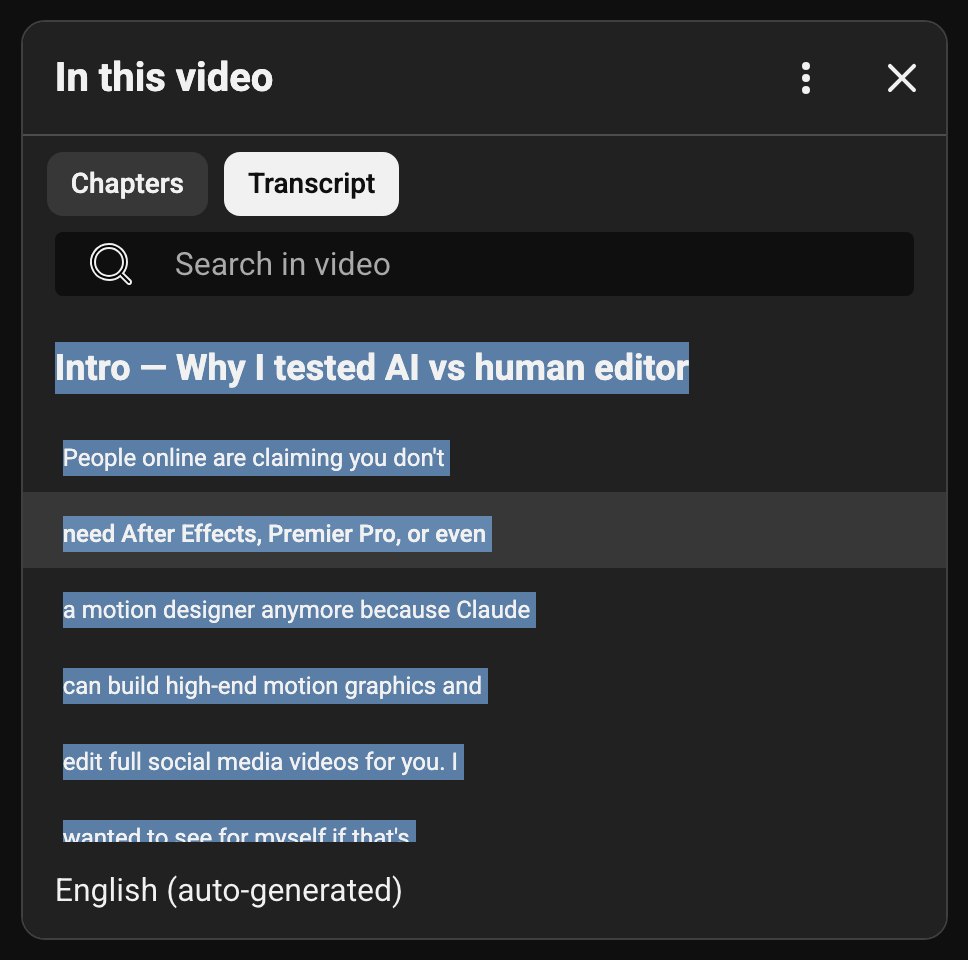
Open a new chat in ChatGPT, Claude or Gemini. Paste the prompt, then paste the transcript right under it. Send.
3 Make it about you
The prompt on its own gives you the best general version of the video. Put this on top of it, with your profile under it, and you get yours.
Here's who I am and what I'm building. Fit every section to me, especially section 10, and tell me which parts of this video don't apply to me and why:

[paste your profile]
Your profile is the one-page summary from Teach your AI who you are. No profile yet? Three lines do: what you're building, who it's for, and where you are now. If your AI's settings already hold your profile, keep only the first line.
4 Ask the follow-ups
In the same chat, after the breakdown.
A checklist for today
Turn section 10 into a checklist I can do today, in order, with how long each step takes. Mark anything that needs money, an account or someone else's help.Will it work for me
What would this look like for my business specifically? Walk through it with my real situation. Where would it break, and what would I change?Fill the gaps
Answer the open questions in section 8 for me where you can. For the ones you can't, tell me exactly where to find the answer or what to test.Three videos, one topic (new chat, all three breakdowns under it)
These are breakdowns of three videos on the same topic. Compare them: where they agree, where they disagree, what only one of them covers, and which method fits me best. Then give me one combined process.5 Keep what you learn
Save every breakdown in one place: a note, a document, or a ChatGPT or Claude project. Name it by topic and date. After five on one topic, paste them all into a new chat under this. The playbook is what you come back to; the videos were the raw material.
These are my breakdowns of several videos on [topic]. Merge them into one playbook for me:
1. The process, step by step, using the best version of each step across all of them
2. Where they disagree, and which way fits me
3. The mistakes they all warn about
4. What none of them explained, that I still need to find out
5. My next three moves

Keep the creators' names next to the ideas that came from them.
6 See it on a real video
We ran the prompt on a public tutorial by kaye.creatives about editing reels with Claude. Two pieces of what came back, in short:
- From section 3: paste the exact script you spoke, not the one you planned. Captions and cuts sync to the words, so if they don't match the take, the captions drift.
- From section 10: the best first move is one short clip you already have, exactly what you said in it, and three references that share one style. Leave the full motion test and selling it as a service for later.
Watch the whole video, and like and subscribe to the channels you learn from. The breakdown helps you use what they teach; the creator did the hard work, and that support is how they keep making it.
Can AI summarize a YouTube video from just the link?
Yes, if the AI can read the video's transcript. ChatGPT's Chrome extension does it with a free account, and Claude's needs a paid plan. With no extension, copy the transcript from YouTube into any AI chat. Our guide adds a prompt that turns the video into steps fitted to what you're building.
Why can't Claude summarize YT videos?
Claude can't watch a YouTube link on its own, but it can read the transcript. Open the video in Chrome with the Claude extension, which needs a paid plan, or copy the transcript from YouTube and paste it into Claude with our prompt. Either way you get the steps, the strategy and your first move.
Good to know
- Long videos: a two-hour transcript can be too long for a free plan. Split it in two, run the prompt on each half, then ask it to merge the two breakdowns in order.
- Auto transcripts get names wrong. In our sample, Claude came out as Cloth and Claw, and one tool's name came out four different ways. Check anything you'll act on against the video.
- If section 8 is long, the video skipped a lot. That's useful to know too.
- Give creators their credit. Watch the video, like it and subscribe to the channels you learn from. Don't post someone's breakdown as your own content; if you share what you learned, name and link the creator.
What you'll have
Any tutorial, interview or breakdown turns into a process you can run, fitted to what you're building, saved where you can learn from it again.
Part of Your brand and business, with AI: step 2 of 8